Fabric collection and database
You can now keep track of your fabric collection on Flosshaven, as well as link projects to fabrics and browse the new fabric database
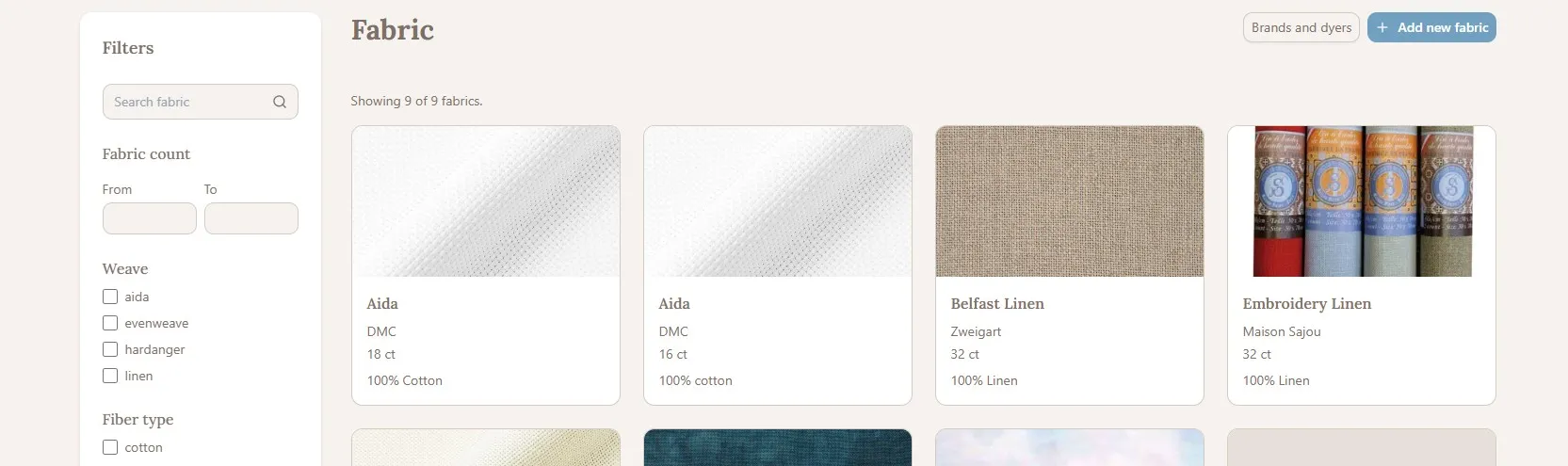
A big new feature has arrived to Flosshaven, a fabric database and your personal fabric collection!
This update introduces multiple new features and options, so I have written up a how-to and some questions you might have when using the new feature. If you have a question that is not answered here, please feel free to ask in the discord or contact us.
Add fabric to your collection
Go to My Profile > Fabric Collection > Add fabric to add a new fabric to your collection.
You can either add fabric from entries in the database, or if you do not know the brand or type of fabric, you can add a manual entry.
From the database
If you know the brand and type of fabric, connecting it to entries in the database will make your stashed entry show up in searches and help build out the database. So I highly encourage you to link your entries if you are able to.
Start by typing in the name of the fabric you are adding, any fabric in the database with the same name will show up in the drop down and be selectable. If the fabric you are adding is not in the database yet, you can add it to the database.
When you select a fabric from the database, the fabric count will be automatically added. You can then add the name of the colorway, if someone else has added the same colorway to their collectoin, it will show up as a selectable entry. Since the database does not have one entry per fabric color, this is how information about fabric colors is collected. If this is a fabric you have dyed yourself, select the box "hand dyed by me".
You can add tags to your stashed entries, such as Weave, Fiber type, and Dyeing method. In this example we have linked to a fabric in the database, and the suggested tags are based on the tags from the linked fabric. Adding tags will make it easier for you to search your own collection, but also help other users browse fabrics to find the type they want to use for their own project.
If you have more than one piece of the fabric, you can add multiple cuts. Maybe you purchased multiples of the same color, or used part of the piece of fabric for a project but have some left. This is where you can keep track of that.
Manual entry
If you do not know which brand or fabric type you have, you can create a manual entry in your collection. The only difference is that you will need to add the count manually, and you will not get suggestions for clorway or tags.
Add fabric to the database
If the fabric you want to add to your collection is not in the database, you can add it by going to Add new fabric.
The general rule when adding entries to the database is to think of what information is useful for other people to know about this entry, and what information would they search for when trying to find it.
And if there is a separate field for any information, it's added to that field and not anywhere else.
Start by typing in the brand or dyer of the fabric, if they are not already registered in the database, a new entry will be created, you can edit this later to add more information about the brand/dyer.
Fabric type name is the name of the fabric, such as "Linen" or "Aida", or maybe the creator has a more creative name such as "Cool cross stitch fabric".
Fabric count should not be included in the name, but added in the separate field for fabric count. One brand/dyer might have multiple "Linen" with different counts, so "Linen" would be added as multiple entries for each available fabric count.
Fabric color should not be included in the name, fabric colorways are added in your personal fabric collection.
You can optionally add an image and a description of the fabric.
There are three types of tags - Weave, Fiber type, and Dyeing method, if the tag you need for the fabric you're adding does not already exist you can simply write it in the text box, separated by commas, and it will be added.
Weave is usually how stitchers describe the fabric type such as "Aida", "Evenweave", "Linen", etc.
Fiber type is the tag version of the fiber composition.
Dyeing method is how the fabric is dyed from the brand/dyer, one fabric type might have both undyed, machine dyed, and hand dyed versions.
Add fabric to a project
You can now link your project to a fabric in your collection or in the database, or you can enter fabric information manually.
Linking to a databse entry will make it so people can discover your project when browsing projects using a specific type of fabric. This is very useful for other stitchers, both for inspiration and to see how someone else has stitched a pattern they are interested in, so I highly recommend you add fabric information to your projects if you are able to.
In the new or edit project form, there is now a separate section for fabric. Typing in the fabric text box will bring up all matching entries from the database. If you want to use a fabric in your collection select "use stash fabric", typing in the text box will then bring up all matching entries from your collection. If you link to a fabric in the databse or your collection, information about fabric type and count will be prefilled. You can optionally add information about how you're stitching the project - number of strands of number of fabric threads/holes.
If you do not want to link to a fabric in the database or your collection, you simply write the fabric name manually in the text box and manually select the fabric type and count.
Frequently asked questions
If I have hand dyed a piece of fabric myself, how do I add it to my collection?
If you know the brand and fabric type, you can link it to the related database entry and select the check box "hand dyed by me", if you do not know the brand and type, you can add it as a manual entry and also select the box "hand dyed by me".
I have a piece of fabric I do not know the brand or make, how do I add it to my collection?
You can add it as a manual entry and not connect it to a database entry.
I do not know the brand or make of the fabric I'm using for my project
That is no problem! You can either add it as a manual entry in your collection and link your project to that entry, or you can simply add the fabric information manually in your project.
Log in to react.