How to add patterns to the database
Whether you're a designer adding your own patterns, or a stitcher adding your favorite patterns to the database, there are a few best practices to follow.
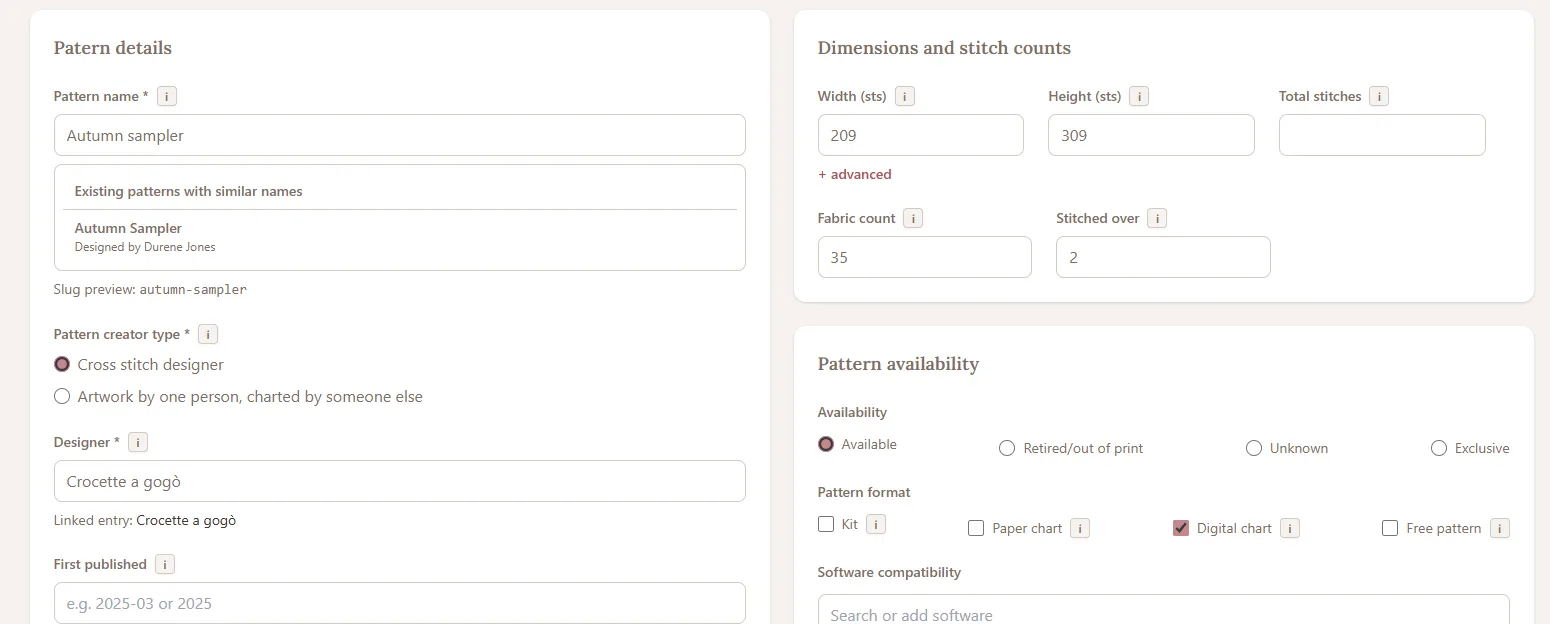
The most important thing to keep in mind when adding a pattern to the database is "what information should I include, and not include, for this to be a useful entry for other people".
In general, that means:
The correct pattern name
Crediting the correct designer
Adding at least one image
Adding links to an official source
Using relevant tags
Not duplicating information
Before you start
Do a quick search to make sure the pattern is not already listed - maybe under a different name?
Also do a quick search to make sure the designer and/or publication is also in the database.
Add these entries first if they are missing.
So let's walk through the entire pattern form and what to include where!
Pattern details
Pattern name
Do: Write the correct name of the pattern, preserve official capitalization and punctuation.
Do not: include unnecessary details such as designer name, publication name, "part of xx collection", "PDF download" etc.
Pattern creator type
Most cross stitch patterns fall into two categories: Entire pattern designed by one designer or the artwork was created by an artist and another person created a chart based on this artwork. The latter category are often full coverage patterns.
Cross stitch designer - the design and chart was created by one person.
Artwork by one person, charted by someone else - original artwork created by an artist and then charted as a cross stitch pattern by someone else. A Full coverage pattern where the artwork and chart is created by the same person should be categorized as "Cross stitch designer".
Designer, Artwork by, Charted by
Do: Write the official name of the creator. Do a search to make sure you are not creating a duplicate entry.
Do not: Add a duplicate entry when creators go by more than one name.
Sometimes creators are referenced by more than one name, for example: "JED XStitch" also goes under the name "Doize Demos", "Heaven and Earth Designs" is run by "Michele Sayetta".
If you do not know the original designer, avoid adding "Unknown". A quick google search usually turns up the correct person to credit.
If you're still not able to find who to credit, please ask in the Discord and we will help you out!
First published
Do: If you know the date pattern was first published, year or year and month, enter it here.
Do not: Add a date with there is no date available.
It should be formatted as YYYY or YYYY-MM.
This is useful information for stitchers looking for patterns from a certain time period for example.
Publications
Do: If the pattern has been published in a book, magazine, pamphlet etc. enter it here.
Don not: Add links to the website the pattern is published.
When you start typing existing entries will show up, so select it if it's already in the database, if it's not already in the database a new entry will be created. It would be very much appreciated if you would then go back to the new publication and add relevant information to that entry as well.
Description
Do: include useful information not covered by any other fields in the pattern form.
Do not: repeat designer, publication, stitch count, floss, format, or availability details in the description when dedicated fields exist
This is where any extra information that is not covered by any other fields in the form is added.
Important information that is useful for a stitcher to know before starting the project, a description of what the design is about or maybe the inspiration behind the design.
Dimensions and stitch counts
This is where you add information about stitch counts. Not all patterns have this information available before purchase, so only add what information you have. This is not required information, but it's super helpful for stitchers to know, both before purchasing a pattern and when searching for their next project.
Width (sts) and Height (sts)
Add number of stitches in the chart for width and height
Total stitches
This can be calculated in a few ways:
Enter it manually
For patterns tagged "full coverage 100%" it's automatically calculated - will overwrite manual entry
When adding floss information, you can choose to use floss stitch counts to calculate total stitch count - will overwrite manual entry
Advanced
Here you have the option to add even more details to the pattern stitch counts. You can specify how many full stitches, half stitches and/or back stitches are in the pattern.
You can also choose to calculate the total stitch count of the pattern based on these fields by selecting "Include in total stitch count", this will overwrite any manual entry of total stitches.
Fabric count and stitched over
Fabric count is either the suggested count by the pattern, or the count of the kit fabric.
In the field "stitched over", you specify how many strands of fabric a stitch is stitched over, to help calculate the finished size. For example, a 14 count is usually stitched over 1, while a 32 count is usually stitched over 2.
Pattern availability
This section is for details about how the pattern is available.
You first select if the pattern is currently available, retired/out of print, unknown, or exclusive.
Pattern format
This required field is to let stitchers know if this is a kit, paper chart, digital chart, and/or a free pattern.
This is very useful information for stitchers as some prefer to only stitch digital patterns, some prefer paper charts, sometimes they're looking for kits, and sometimes a free pattern.
Software compatibility
If it's a digital pattern you can add which software the pattern is compatible with. This is very useful for stitchers who have a preferred program they use for their digital charts.
Links to purchase or download
This is a required field if the pattern is currently available. Add the direct link to the page where the pattern can be purchased or downloaded.
For unavailable patterns still add a link to an official source if you have one.
Do not: add direct download links.
Artwork AI Usage
Flosshaven requires creators to be transparent about their use of AI in the creation of the artwork or design the pattern is based on. You can read more about it here and when to use which tag.
Confirmed no AI - AI was not used to generate any part of the artwork or original design the pattern is based on.
AI generated - The artwork or original design was primarily generated using AI, even if it was later edited or cleaned up by a person.
AI assisted - AI contributed directly to the creation of the artwork or original design, but substantial creative work by a human also contributed to the final result.
Unknown - The AI usage of the artwork or design has not yet been confirmed.
Categories, attributes and themes
This is probably one of the most important things to add to the pattern listing. This is how stitchers can search and filter to find the exact type of pattern they are looking for.
When selecting tags try to select tags that someone would use when trying to find this exact pattern. Tags are important, but the correct tags are more important, avoid tagging every minor element visible in a complex design.
Attributes
These are tags for the characteristics of the pattern itself. Things like "Full coverage", "Fancy lady", "Sampler", "Back stitching", "French knots" etc.
Categories
Categories are tags that describe design elements, such as "Animals", "Flowers", "Quotes" etc.
Themes
Themes describe the overall theme of the pattern, for example "Christmas", "Religious", "Stitch along" etc.
If a tag you think describes the pattern you're adding is missing, you can add it to the database.
Images
Images are also one of the most, if not the most important things to add to the pattern listing. You wouldn't purchase a pattern without knowing what it looks like? Except maybe for secret stitch alongs, but that is the exception.
Do: add at least one clear image of the pattern.
Do not: add multiple images of the same angle, remove creator watermarks.
You can add multiple images, but there is no need to add multiple images of the exact same view. Close ups and details can be very useful though.
Make sure you select a clear image showing the entire design as the thumbnail.
Floss information
This information helps stitchers know what floss to buy and how much and helps them find patterns based on what they already have in stash.
Floss information is unfortunately often not available before purchasing a pattern, but when it is available adding it here is extremely useful.
When a stitcher creates a new project from this pattern, the floss information will be copied over to the project so they can track their floss usage and easily create a shopping list of floss they need to buy.
You can either manually enter floss information or upload via CSV, a CSV tutorial will be published soon.
When adding floss information manually, you first select the floss brand (ex: DMC), then you select the floss type (ex: Mouliné Special), then you start adding each color.
You can either just add the color information, or you can specify how many stitches of each color is used. You can even go as detailed as specifying how many back stitches and half stitches there are of each color.
If you specify stitch counts per floss color, you can choose to use this information to calculate the total pattern stitch count by checking the box "Use floss stitch counts to calculate stitch counts" and then specify which stitch types you want to be included in the total stitch count.
If you're unsure
This might seem like a very complicated process, it's not supposed to be, but data quality is very important.
So if you're unsure about something, feel free to either hop in the Discord and ask, or send a message through the contact form!
Log in to react.